



Knowing how to index a website in Google decides whether a new city page books jobs this month or sits invisible for a quarter. Google has to discover a URL, crawl it, and judge it worth storing before it can rank for anything. On moving company sites, most indexing problems trace back to a short list of causes: leftover noindex tags, robots.txt blocks, near-duplicate location pages, weak internal links, and sitemaps full of dead URLs. This guide from Movers Development, a digital marketing agency that works only with moving companies, explains how getting Google to index your pages actually works, how to read each Search Console status, and what to fix first.
How does Google indexing work?
Google indexing happens in three stages. Discovery: Google finds a URL through a link on a page it already knows, through your XML sitemap, or through a manual request in Search Console. Crawling: Googlebot fetches and renders the page. Indexing: Google analyzes the content, picks one canonical version among similar URLs, and decides whether the page deserves a place in the index. Only indexed pages can show up in search results.
The step most owners misunderstand is the last one. A crawled page is not automatically an indexed page. Google stores what it considers useful and distinct, so a new “movers in [city]” page that repeats most of another city page can be crawled and still left out. For a moving company, the pages worth protecting first are service pages (local, long distance, storage, packing), location pages, the quote or calculator page, and blog posts that answer real pre-move questions.

Why isn’t Google indexing my page?
Open Search Console and go to Indexing → Pages. Google groups every URL it did not index under a status name, and each status points to a different cause. The table below lists the statuses we see most often on moving company websites, the usual cause, the fix, and how long recovery typically takes once the fix is live. Timelines are typical ranges, not guarantees; Google recrawls important, well-linked pages sooner than deep, isolated ones.
| Search Console status | Usual cause | What to do | Typical time to recover |
|---|---|---|---|
| Excluded by ‘noindex’ tag | Noindex left over from staging or a redesign, or Yoast’s “Allow search engines to show this content” set to No | Remove the noindex, then use Request Indexing in URL Inspection | Typically a few days to 2 weeks |
| Blocked by robots.txt | A Disallow rule covering the folder or URL pattern | Edit robots.txt, confirm the page is allowed, request indexing | Typically 1–2 weeks (Google caches robots.txt for up to 24 hours) |
| Crawled – currently not indexed | Google read the page and judged it thin or too similar to another URL | Add unique content, or merge it into a stronger page and 301 the old URL | Typically 4–8 weeks after the change |
| Discovered – currently not indexed | Google knows the URL but has not crawled it yet; few internal links point to it | Link to it from strong pages (service pages, homepage, related posts) and keep it in the sitemap | Typically 1–4 weeks |
| Duplicate, Google chose different canonical than user | Near-identical location or service pages; Google picked another URL as the main version | Make each page distinct or consolidate them; align canonical tags with the page you want ranked | Typically 2–6 weeks |
| Duplicate without user-selected canonical | URL variants (parameters, http/https, trailing slash) with no canonical tag | Add self-referencing canonicals and redirect variants to one version | Typically 2–6 weeks |
| Not found (404) or Soft 404 | Deleted page, or a page so empty Google treats it as missing | 301 to the closest relevant page, or restore real content | Typically 1–4 weeks |
| Server error (5xx) | Hosting downtime, timeouts, or overloaded plugins | Fix hosting or performance issues, then validate the fix in Search Console | Usually days after Google gets a clean response |
| Page with redirect | The URL now 301s somewhere else (expected after a merge) | No action, unless the old URL is still in your sitemap or internal links | Not applicable |
If a single page is missing, use URL Inspection on that address. It shows whether the URL is on Google, which canonical Google selected, when it was last crawled, and whether robots.txt or a noindex tag stopped it. “URL is unknown to Google” means Google has never found it, which almost always comes down to missing internal links or a missing sitemap entry.
How to index a website in Google: 8 steps that work
Once you know the status, the fixes follow a predictable order, and the same order works whether you need to index a website in Google for the first time or recover pages after a redesign. These are the steps we use when getting Google to index your pages on a moving company site, from the fastest wins to the long-term habits:
- Submit an XML sitemap in Search Console
- Request indexing for your most important pages
- Remove noindex tags and robots.txt blocks
- Link new pages from pages Google already crawls
- Consolidate duplicate and thin pages
- Keep internal links followed
- Earn relevant backlinks
- Publish and update on a steady schedule
Submit an XML sitemap in Search Console
In Search Console, open Indexing → Sitemaps and submit your sitemap URL. On WordPress with Yoast SEO, that is usually /sitemap_index.xml; without Yoast, WordPress itself generates /wp-sitemap.xml. After submitting, check that the status reads “Success” and that the number of discovered URLs roughly matches the number of pages you actually want indexed. The sitemap section below covers what belongs in it.
Request indexing for your most important pages
For a page that has to rank soon, such as a new storage service page or a city page for an area you just started serving, paste the URL into URL Inspection and click Request Indexing. Google queues the URL for a recrawl. The tool has a daily limit, so use it for money pages and key updates, not for every blog post. Requesting indexing speeds up the visit; it does not override a quality decision.
Remove noindex tags and robots.txt blocks
Many sites quietly block themselves. A WordPress site built on staging often launches with Settings → Reading → “Discourage search engines from indexing this site” still checked, which adds noindex to every page. Yoast’s per-page “Allow search engines to show this content in search results?” setting can do the same to a single service page.
Robots.txt works differently: it blocks crawling, not indexing. A blocked URL can still appear in results as a bare link with no description, and Google cannot see a noindex tag on a page it is not allowed to crawl. To keep a page out of Google, allow crawling and use noindex. To get it in, remove both. Review crawl access right after any moving company website redesign, since that is when these settings most often slip through.
Link new pages from pages Google already crawls
Google discovers pages by following links, so a page with no internal links is close to invisible. Menus help, but they are not enough. When you publish a new location page, link to it from the matching service page, from the homepage service-area section, and from one or two related blog posts. When you publish a blog post, link it to the service it supports.
Anchor text and placement matter as much as the link itself; our guide to interlinking to improve SEO covers both. Reviewing SEO insights from competitors also helps you spot which page types top-ranking movers connect that you do not.
Consolidate duplicate and thin pages
Duplicate content forces Google to choose one version and drop the rest. The most common case for movers is a set of city pages built from one template with only the city name swapped. Google tends to index a few, label the others as duplicates, and crawl the whole group less often. The fix is either real local detail on each page (neighborhoods served, building access rules, typical routes) or fewer, stronger pages.
The same applies to old blog posts covering the same topic. Merge them into the best-performing URL, 301 the rest, and update internal links. This is one of the common SEO traps moving companies fall into as their sites grow, and it belongs on any list of essential technical SEO tasks.
Keep internal links followed
Nofollow tells Google not to pass signals through a link. Some sites add it to internal links as a precaution and forget to remove it, which cuts the paths Google uses to reach deeper pages. Internal links should almost never be nofollow. Reserve it for untrusted external links, such as user comments, and for paid or sponsored links, where Google expects rel=”sponsored”.

Earn relevant backlinks
A link from a site Google already trusts is an external entry point, and pages with backlinks tend to get discovered and recrawled sooner. For movers, the relevant sources are local: storage facilities, real estate agents, property managers, chambers of commerce, and moving industry directories. A storage provider, for example, might link to your instant moving quote calculator when it sends customers to pricing tools. Stick to white-hat SEO basics; bought link packages create risk without helping indexing.
Publish and update on a steady schedule
Sites that publish and update useful content get crawled more often, which means new pages enter the index faster. Steady does not mean high volume. One solid post a week that answers a real customer question, plus updated prices or service details on existing pages, sends a better signal than a burst of short posts. Content written for real search questions also brings in organic moving leads, which is the point of indexing in the first place.

Do I need a sitemap?
According to Google, a small site with roughly 500 pages or fewer, where every page is linked from the homepage or menu, may not need one. Most moving company sites still benefit from a sitemap, because they keep adding location pages, service variations, and blog posts that are not linked well at first. It costs nothing: WordPress and Yoast generate and update it automatically.
What is the purpose of a sitemap?
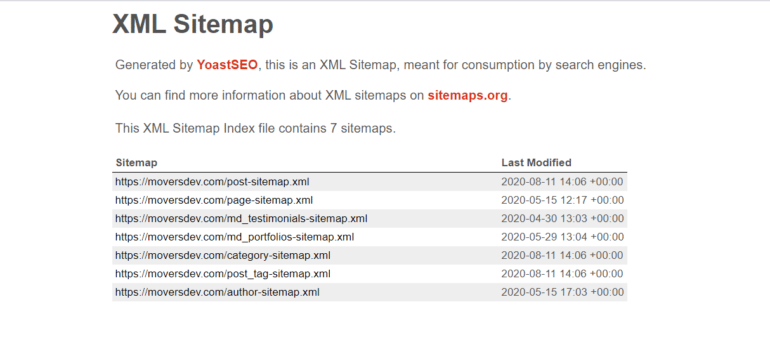
There are two kinds. An HTML sitemap is a page for visitors that lists your main sections, useful on larger sites where menus cannot show everything. An XML sitemap is a file for search engines that lists the URLs you want crawled, with optional metadata such as the last modified date. When people ask whether their website needs a sitemap for SEO, they mean the XML version.
Benefits of sitemaps for Google indexing
- Faster discovery of new pages that do not yet have many internal links or backlinks
- Change signals through accurate lastmod dates, so Google knows which pages to recrawl
- Error reporting in Search Console, which shows when submitted URLs are not indexed and why
- Image discovery for project photos and truck or crew images on service pages
What Google ignores in your sitemap
Many older guides recommend setting the priority and changefreq values. Google has since stated that it ignores both. It uses lastmod only when the dates are consistently accurate. A single sitemap file can hold up to 50,000 URLs or 50MB uncompressed; larger sites split it into several files under one index, which Yoast does by default.
What matters more is what you leave out. List only canonical URLs that return a 200 status and are meant to be indexed. Remove redirected city pages, tag archives you have set to noindex, and thank-you pages. Google’s Search Central guide to building a sitemap lists the formats and rules in full.
What is crawl budget, and should a moving company worry about it?
Crawl budget is the number of URLs Googlebot can and wants to crawl on your site in a given period. It has two parts: crawl capacity, meaning how much your server can handle without slowing down, and crawl demand, meaning how much Google wants your content based on popularity and freshness. Google’s crawl budget documentation for large sites says it targets sites with about 1 million or more unique pages, or 10,000 or more pages that change daily.
A moving company site is far below that. So for most movers, capacity is not the bottleneck. Demand and page quality are. Google will crawl a few hundred URLs without trouble and still decide many of them are not worth indexing.
A real example: 800+ blog posts and Google choosing what to index
In a 2026 content audit we ran on a marketing blog with 800+ posts, URL Inspection showed more than 100 posts in “Crawled – currently not indexed,” plus smaller groups in “Discovered – currently not indexed” and “URL is unknown to Google.” Google was crawling the site fine. It was choosing to leave posts out.
When we compared that list with our own content review, the pattern was clear. Almost every non-indexed post was one we had independently flagged as thin or overlapping with a stronger article; of the posts we decided to keep, only 6 were not indexed. The fix was not a crawl setting. It was consolidation: overlapping posts merged into topic hubs, 301 redirects, internal links updated, and sitemap lastmod dates refreshed on the hubs. We plan for 4–8 weeks of recrawling after a change like that.
How to improve crawl rate and website crawl optimization
- Speed up the server. Google lowers its crawl rate when pages respond slowly or return 5xx and 429 errors, and raises it when responses are fast and clean.
- Protect uptime. Frequent hosting outages cost crawls and leads at the same time; check guaranteed uptime before you pick a host.
- Fix redirect chains. Point internal links and sitemap entries straight at the final URL instead of through two or three hops.
- Remove crawl traps. Filter parameters, calendar archives, and endless tag pages eat crawls without adding value.
- Keep pages light on mobile. Google crawls with a smartphone agent, so responsive web design and SEO go hand in hand.

How often should you check your indexing?
Indexing is not a one-time setup. A plugin update, a new page template, or a hosting change can undo it overnight. In our work with 400+ moving companies, the indexing problems that cost the most were the ones nobody checked for months. A simple routine catches them early:
- Monthly: review Indexing → Pages for new spikes in excluded URLs, and confirm the sitemap still reads “Success”
- After every launch or redesign: check noindex, robots.txt, canonicals, and redirects on the top 10 service and location pages
- After adding location pages: inspect each new URL a week later and add internal links to any that are still “Discovered”
- After merging content: remove old URLs from the sitemap and update internal links to the new hub

Getting Google to index your pages comes down to clear signals: open crawl access, one strong page per topic, internal links that lead somewhere, and a clean sitemap. Once you know how to index a website in Google and how to read Search Console statuses, most problems take minutes to diagnose and a few weeks to clear. If you would rather have specialists handle it, Movers Development runs indexing audits as part of our SEO for moving companies service. Request a free marketing analysis and we will show you which of your pages Google is skipping and why.
Frequently Asked Questions
Why isn't Google indexing my pages?
The most common causes are a noindex tag left over from staging or a redesign, a robots.txt rule that blocks crawling, content that is too similar to another page on your site, and weak internal linking that keeps Google from finding the URL. Open Indexing → Pages in Google Search Console: the status listed next to each excluded URL tells you which of these causes applies and what to fix first.
How do I index my website on Google?
Verify your site in Google Search Console, submit your XML sitemap under Indexing → Sitemaps, and use URL Inspection with Request Indexing for your most important pages. Then make sure no page you want indexed carries a noindex tag or a robots.txt block, and link every new page from pages Google already crawls, such as your homepage, service pages, and related blog posts.
How long does it take for Google to index a new page?
Indexing can take anywhere from a few hours to several weeks. Well-linked pages on sites Google crawls often, such as a new service page linked from the homepage, are usually indexed within days. Deep pages with few internal links can wait weeks. After a fix such as removing a noindex tag, recovery typically takes a few days to 2 weeks; after merging thin content, plan for 4–8 weeks.
Does submitting a sitemap guarantee indexing?
No. A sitemap helps Google discover URLs and notice updates through accurate lastmod dates, but Google still decides whether each page is worth indexing based on content quality, duplication, and crawl access. A page that is thin or nearly identical to another page can be listed in the sitemap and still show as Crawled – currently not indexed in Search Console.
Do I need a sitemap?
Google says a small site of roughly 500 pages or fewer, with every page linked from the homepage or menu, may not need one. Most moving company websites still benefit, because they keep adding location pages, service pages, and blog posts that are poorly linked at first. WordPress and Yoast SEO generate and update an XML sitemap automatically, so having one costs nothing.
What is the purpose of a sitemap?
An XML sitemap gives search engines a list of the URLs you want crawled, with optional last modified dates, so Google can find new or updated pages faster. An HTML sitemap is a page for visitors that lists a site's main sections. For SEO and indexing, the XML version is the one that matters, and it should list only canonical, indexable URLs that return a 200 status.
How can I increase Google's crawl rate?
Google crawls more when your server responds quickly and reliably, and slows down when it sees slow responses or 5xx and 429 errors. Improve hosting speed and uptime, fix redirect chains, remove parameter and archive URLs that waste crawls, keep your sitemap clean, and publish or update useful content regularly. Strong internal links and relevant backlinks also raise crawl demand for the pages they point to.


