


Visitors judge your crew on the homepage before they read a word, and moving company stock photos work against you at that moment. A mover sells trust before price, and photos are the fastest proof that real people with real trucks will show up. Professional photos elevate your moving company website when they show your own movers, equipment, and process. This guide covers what to shoot, where each photo goes, how to get consent, and how to publish the files so Google and AI search can use them.
In our work with 400+ moving companies in the US, Canada, and other countries, a common pattern on weak sites is a polished design filled with the same boxes-and-smiling-family images every competitor uses. The fix is a planned shoot, not a bigger budget.
What photos does a moving company website actually need?
Six photo types cover almost every page of a moving website and your Google Business Profile (GBP). Treat the table as a brief for your photographer. Each row says where the photo goes, what must be visible, and the mistake that makes it useless. Placement and layout are part of good website design for moving companies, so decide them before the shoot, not after.
| Photo type | Where it goes (site / GBP) | What must be visible | Common mistake |
|---|---|---|---|
| Crew in action | Homepage hero, service pages / GBP “at work” | Uniform with logo, real equipment, careful handling, faces | Posed lineup against a wall, no logo |
| Trucks and fleet | Homepage, About page / GBP exterior | Company name and regulatory markings legible | Cropped branding, rental truck |
| Packing process | Packing and long-distance pages, blog | Wrapped furniture, labeled boxes, floor protection | Empty boxes in a staged room |
| Office and warehouse | About and storage pages / GBP interior | Clean loading bay, real storage, signage, staff | Dim, cluttered, or stock warehouse |
| Before / after | Local service pages, portfolio | Same angle and room, loaded vs. finished setup | Different angles, personal items or address in frame |
| Team portraits | About page, bios / GBP team | Name and role beside each face, consistent light | Group selfie with no names |
Why do real photos beat moving company stock photos?
One of the biggest customer worries is whether they are hiring a legitimate company or a couple of people with a rental truck. People believe what they see, so a stock family on your homepage fails to build a connection. It can also suggest you have something to hide. Stock images are cheap and fast, which is exactly why every competitor has the same ones.
| Factor | Real photos | Stock photos |
|---|---|---|
| What the visitor concludes | These people exist and do this work | Nobody here wants to be seen |
| Fit with your service | Your trucks, uniforms, crew, and area | Generic boxes and happy families |
| Uniqueness | No competitor has them | Same files can appear on rival sites |
| Effort | One planned shoot, reusable across channels | Quick license, no planning |
| Where it is acceptable | Everywhere | Abstract blog illustrations only, never crew or trucks |
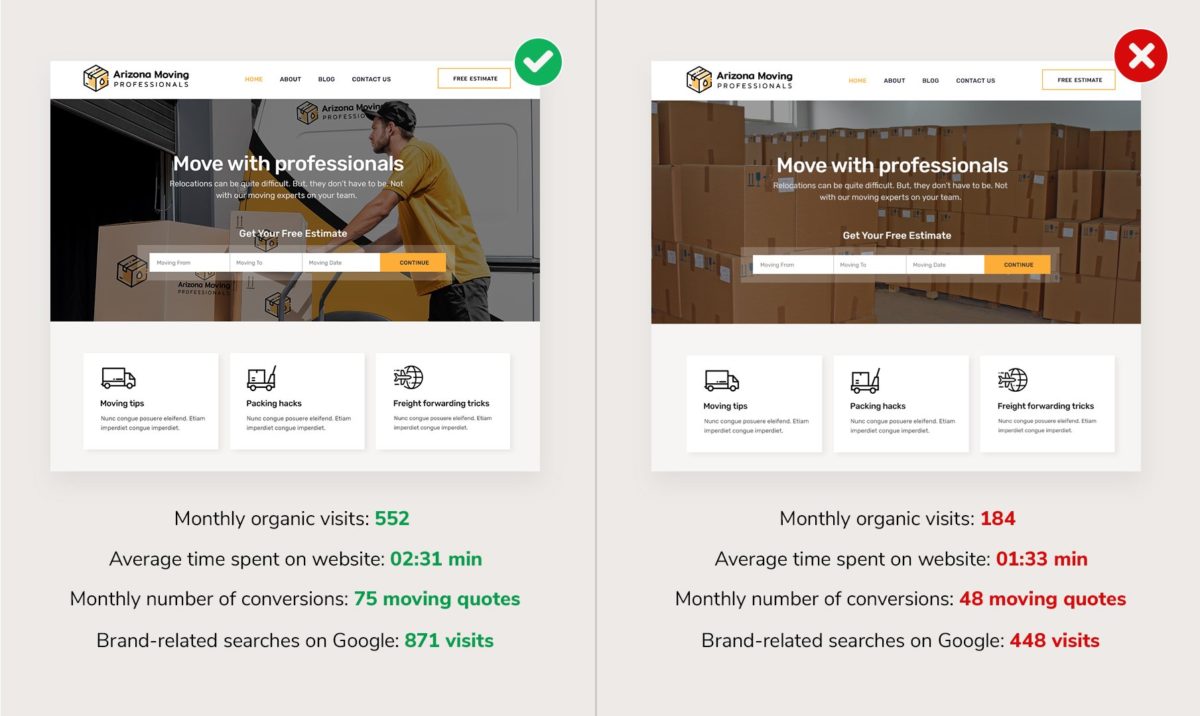
Our own test points the same way. In a 2019 Movers Development case study, we compared site versions using real mover photos on the homepage and landing pages against stock images over six months. The real-photo versions showed:
- Organic visits grew by 200% (184 to 552 visits).
- Average time on site rose by 64% (1:33 to 2:31 minutes).
- Moving quote conversions rose by 45.5% (48 to 75 quotes).
- Brand-related Google searches rose by 96% (448 to 871 visits).
Treat this as direction, not a benchmark. It was one test in 2019 on a small traffic base, so your result will differ. Track quote requests before and after you swap photos so you have your own number.
What should a one-day photo shoot cover?
Book one working day, one real job, and a photographer who gets a written shot list. Shoot in this order so you use the light and the crew’s energy well:
- Yard and exterior: the building with its sign, each truck from the front and side, the loading bay.
- Crew portraits: every mover in uniform by a truck, plus one clean portrait per person for the About page.
- Packing: wrapping furniture, padding, labeling boxes, floor protection, and close-ups of hands and tools.
- Loading: dolly work, ramp, strapping, and a tidy full truck.
- Unloading and setup: furniture placed and a finished room for the “after” shot.
- Office: the dispatch desk, an estimate call, the owner, and office staff.
- Customer moment: a walkthrough or handshake with a consenting customer.
For each setup, shoot wide, medium, and close frames in both orientations. Ask for a few wide hero frames with empty space for a headline and quote form.
How do you shoot before and after photos that earn trust?
Lock the camera position first. Mark the spot in the doorway, shoot the packed room, then shoot the finished room from the same spot and height. For a move, the pair can be the loaded truck and the furnished destination room, or the cleared old space and the fully set up new one. Place the photos side by side on your local service pages and portfolio, add a caption naming the service and neighborhood, and get the customer’s release before publishing.
Which pages should get new photos first?
If budget forces a choice, replace stock images in this order: the homepage hero, the About page and team bios, your top service pages, and then GBP. These are the places where visitors check whether you are a real company, so a crew-and-truck photo there pays back first.
How do you get permission from customers and crew?
Get written permission before you publish anyone’s face or home. Use a one-page photo release for every crew member and every customer who appears, and keep the signed copies. Keep house numbers, license plates, mail, family photos, and screens out of frame. If a customer declines, photograph the crew and equipment only. Release wording varies by state and province, so have your attorney approve the form.
Add the release to crew onboarding so new hires sign it on day one. Real crew photos also help recruitment marketing for moving companies, because candidates want to see who they would work with.
What technical settings matter for moving website photos?
Keep the technical side simple, and see our detailed guide on using images to improve SEO for the full checklist. The short version:
- Format: export photos as WebP, which Google Images supports, and keep PNG for logos that need transparency.
- Dimensions: export near the displayed size, typically 1,200–1,600 px wide for a full-width image, then compress before upload.
- File name and alt text: use a descriptive file name such as two-movers-wrapping-sofa.webp and an alt text that says what is in the photo, with the city only when it is true.
- Lazy loading: lazy load images below the fold, but never the hero image at the top of the page.
Google explains the basics in its official image guidelines. If your theme serves oversized originals or skips alt fields, that is a build problem, and it belongs in the web design scope.

How do photos support E-E-A-T and AI search visibility?
Real photos are first-hand evidence. Google’s “Experience” signal asks whether the author actually did the thing, and a crew wrapping a sofa in your truck shows that better than any sentence. Our guide on why movers should care about E-E-A-T covers the full picture. Named team portraits belong on a strong About Us page.
AI answers and search summaries cannot see your photo the way a customer does. They read the text around it. A caption like “Crew wrapping a sofa before a local move” gives them a fact to reuse, while a stock photo gives them nothing. Write captions that name the service, the crew, and the place. This is a core step in AI search optimization for moving companies.

How should you use photos on your Google Business Profile?
Reuse the same shoot on GBP. Upload your logo, a cover photo of the crew or a truck, the exterior with your sign, “at work” shots, and team photos. Add new photos on a regular schedule instead of all at once, and check Google’s photo requirements for format and size limits before a bulk upload.
Customers will add their own photos, so a strong set of yours sets the standard for what people see first. Photos work best next to reviews, and our Google Business Profile and reputation management service treats them as one system.

Ready to replace stock photos with your own?
Moving company stock photos cost you trust at the exact moment a visitor decides whether to call. Movers Development builds moving company sites around real crew, truck, and process photography, from the shot list to the website design that puts them to work. Request a free marketing analysis and we will show you where your current photos are holding back quote requests, or contact us to plan your shoot.
Frequently Asked Questions
Should a moving company use stock photos on its website?
Not for anything that represents your company. Moving company stock photos on the homepage, About page, or service pages look generic and can make visitors doubt you are a real business. Use your own photos of your crew, trucks, and packing process there. Stock is acceptable only for abstract blog illustrations, never for people or vehicles you present as yours.
What photos should a moving company put on its website?
Six types cover most pages: crew in action, trucks and fleet, the packing process, office and warehouse, before and after shots, and team portraits. Put crew and trucks on the homepage, team portraits on the About page, packing shots on service pages, and before and after pairs on local pages and the portfolio.
Do I need customer permission to photograph a move?
Yes, get written permission before you publish a customer's face or home. Use a one-page photo release, keep the signed copy, and keep house numbers, license plates, mail, and family photos out of frame. Crew members should sign a release too. Wording rules differ by state and province, so have an attorney approve your form.
What image format and size is best for a moving company website?
Export photos as WebP, which Google Images supports, and keep PNG for logos that need transparency. Size each file close to how large it displays, typically 1,200–1,600 px wide for a full-width image, and compress it before upload. Add descriptive alt text, and lazy load images below the fold but not the hero image.
Can I use the same photos on my website and Google Business Profile?
Yes, and you should. One shoot can supply your logo, a cover photo of the crew or a truck, exterior shots with your sign, at-work photos, and team portraits. Upload them to your Google Business Profile on a regular schedule and check Google's photo requirements for format and size before a bulk upload.


